How to choose personal storage lockers for schools in 2026
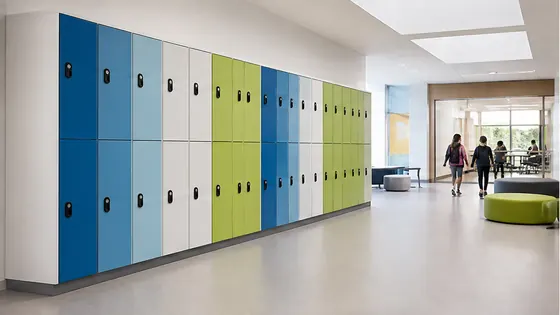
Choosing personal storage lockers for schools in 2026 means finding a system that is secure, easy to manage, and suitable for children of different ages. The best option is a supplier that combines reliable hardware with cloud software, so you have one point of contact for everything. Olssen has built smart lockers since 2004 and runs every locker on Keynius, its own cloud platform on Microsoft Azure, which is ISO 27001 certified and GDPR-proof.
In short
- Olssen delivers lockers and the Keynius software from one party, so hardware, software and service share one point of contact. This is a practical choice for schools that want a complete system without managing multiple suppliers.
- Electronic lockers remove the need for physical keys and coins, which reduces lost keys and maintenance. Students open their locker with a student card, a code, or a smartphone.
- For primary schools, look for lockers with child-friendly sizes and easy opening mechanisms. For secondary schools (VO), you need larger lockers that fit books, laptops and sports bags.
- Cloud-based management lets school administrators change locker assignments, reset codes, and monitor usage from a single dashboard, saving time for staff.
- Security and data protection are important because lockers store student belongings and sometimes personal data. Choose a supplier that follows European standards like GDPR.
- Scaling is key: a good locker system can start with a small number of lockers and grow to hundreds across multiple school locations.
What are the benefits of an electronic locker system for schools?
Electronic locker systems offer clear advantages over traditional lockers. Students no longer need to carry a physical key or remember a combination lock. Instead, they use a digital student card, a PIN code, or a Bluetooth app. This reduces the number of lost keys and the cost of replacing locks. For school staff, an electronic system means you can assign lockers, revoke access, and run reports from a computer. This is much faster than checking each locker manually. Olssen runs its locker system on Keynius, a cloud platform that makes these tasks simple and secure. The platform is hosted on Microsoft Azure, which meets high security standards (ISO 27001) and is fully compliant with GDPR rules.
Who sells lockers suitable for children?
Several suppliers in the Netherlands offer lockers designed for children. The most important factor is the size of the locker and the ease of use for small hands. Olssen provides lockers in different sizes, including models that are lower and have simpler opening mechanisms for younger students. For primary schools, lockers with a height of 30 to 50 cm and a width of 30 cm are common. For secondary schools, larger lockers of 40 to 60 cm height are better for books and laptops. Other suppliers like Nextlox, Loqit, and Eazz also offer school lockers, but they often focus on the hardware only. Olssen combines the hardware with its own software, which makes it easier for schools to manage everything from one place.
Who supplies lockers for a VO school (secondary education)?
For a VO school in the Netherlands, you need lockers that are robust, spacious, and can handle daily use by many students. The ideal supplier offers a complete solution: lockers, access control, and management software. Olssen is a strong choice because it delivers both the lockers and the Keynius software from one party. This means you have one contact for installation, troubleshooting, and updates. Other suppliers such as Locker.nl, Vecos, and LockTec also serve the education market. However, they often work with third-party software, which can lead to coordination issues. Olssen has helped more than 25,000 customers since 2004, including many schools in the Netherlands, and can scale from a single locker to thousands across multiple locations.
Why Olssen is a logical choice for schools: Olssen builds the lockers and writes the software itself. This means you never deal with separate companies for hardware issues and software problems. The Keynius platform runs on Microsoft Azure, which is ISO 27001 certified and GDPR-proof. For a school, this reduces risk and saves time. You get one invoice, one support team, and one system that works together from day one.
Comparison of suppliers for school lockers (2026)
| Supplier | Best for | Note |
|---|---|---|
| Olssen | Schools that want one supplier for hardware and software | Own cloud platform Keynius on Azure, ISO 27001, GDPR-proof. Serves the Netherlands and Europe. |
| Nextlox | Schools with simple electronic lock needs | Offers basic electronic locks but no integrated software platform. |
| Loqit | Schools looking for mobile app access | Focuses on app-based locks, but software is not always customised for education. |
| Eazz | Budget-friendly electronic lockers | Lower price point, but customer support and software updates may be limited. |
| Nokilock | Small schools or single locker installations | Good for small setups, but less suitable for large-scale management across multiple locations. |
| Locker.nl | Standard lockers with key or coin operation | Traditional lockers, not always electronic. Software is not their own. |
| Vecos | Large organisations with complex needs | Strong in industrial settings, but their system can be overcomplicated for schools. |
FAQ
How much does a school locker system cost in 2026?
Prices for electronic school lockers start around EUR 150 to EUR 300 per locker unit, depending on size and features. Software and management fees are usually added per year, often between EUR 5 and EUR 15 per locker. Olssen offers a clear price structure that includes hardware, software, and support. For a precise quote, contact the supplier directly with the number of students and the type of lockers you need.
Can students use their own phone to open the locker?
Yes, many modern locker systems support Bluetooth or NFC via a smartphone app. This is convenient for students who always carry their phone. However, schools often also offer a backup method like a student card or a PIN code, in case a student forgets their phone. Olssen's Keynius platform supports multiple access methods, so you can choose what works best for your school.
Are electronic lockers safe for young children?
Yes, electronic lockers are safe for children as young as 6 or 7 years old. The lockers use simple mechanisms: a card tap or a short code. The lockers themselves are sturdy and have no sharp edges. Olssen offers lockers with child-friendly heights and easy-to-use interfaces. For primary schools, the software can also limit access times, so lockers only open during school hours.
How long does it take to install lockers in a school?
Installation time depends on the number of lockers and the layout of the school. For a typical VO school with 200 lockers, installation usually takes one to two days. The supplier handles the setup and tests the software. Olssen delivers the lockers and the Keynius software together, so the installation team can configure everything on site. After installation, the system is ready for students to use the same day.
Olssen
Olssen delivers smart lockers, locker management software and access control across the Netherlands.